Communication
Getting started with the communication
Goals
Here, you will learn how to use the communication for the e-pucks
You will learn these functions : init_client_communication(), init_webots_communication()
Optionally, use the Webots communication
Short Exaplanation
The communication lets you interchange data between the e-pucks and you.

- As reference of the the above picture:
Computer 2 acts as the host manager.
Computers 1 and 3 connect to the open port of computer 2 to put and retrieve data in the dictionnary of the host manager.
Each e-puck that is connected to host manager can receive up to 30 messages to avoid overflow.
Example
First you need to create a host manager on a computer with the help of the GUI, in our example it will be computer with the ip address 192.168.2.2.
Note
More information to launch the GUI in the Graphic User Interface section
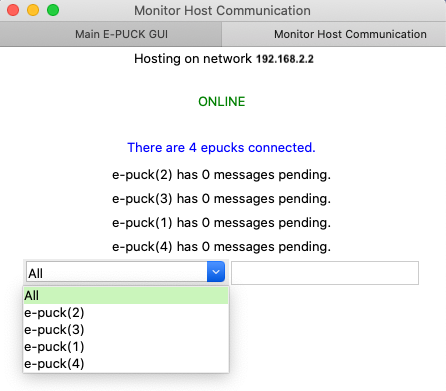
Secondly, you need to launch the robots and call init_client_communication() to connect to the host manager.
from unifr_api_epuck import wrapper

robot = wrapper.get_robot()
robot.init_client_communication('192.168.2.2') #connect to computer 2

while robot.go_on():
    if robot.get_id() != 'e-puck(2)' and robot.has_receive_msg():
        print(robot.receive_msg())

    if robot.get_id() == 'e-puck(2)':
        robot.send_msg('Hey I am e-puck(2)')
You must always keep checking if the robot has received messages with has_receive_msg() otherwise the host manager will consider that the robot does not longer wants to communicate.
(Optional) Use the Webots Communication
It is possible to use the emitter and receiver of webots.
- To use it:
You must only use simulated robots and it can only send strings between them.
The GUI should not be used.
Replace init_client_communication() with init_webots_communication()
from unifr_api_epuck import wrapper

robot = wrapper.get_robot()
robot.init_webots_communication()

while robot.go_on():
    if robot.get_id() != 'e-puck(2)' and robot.has_receive_msg():
        print(robot.receive_msg())

    if robot.get_id() == 'e-puck(2)':
        robot.send_msg('Hey I am e-puck(2)')