WifiEpuck
Table Of Contents
Code
- class WifiEpuck(ip_addr)
- get_id()
- Returns:
The ip address (replace the dots with underscores e.g: x_x_x_x)
- set_id(new_id)
Set new ID for the e-puck
- get_ip()
- Returns:
The IP address of the e-puck
- go_on()
Sends and receives commands between computer and robot.
- Returns:
True (if no problem occurs)
- sleep(duration)
Pause the execution during duration seconds
Warning
This implementation is to be preferred to the standard Python time.sleep() which can lead to problems in the sequence of event handling.
- Parameters:
duration – duration in seconds
- get_battery_level()
Gets robot’s battery level.
- set_speed(speed_left, speed_right=None)
Sets the speed of the robot’s motors
- Parameters:
speed_left – int
speed_right – int, optional (default: is the same speed as speed_left)
Note
The speed of each wheel is already bounded between -7.536 and 7.536
- get_speed()
Gets speed of the motors
- Returns:
[left_wheel, right_wheel]
- Return type:
[int, int]
- bounded_speed(speed)
Limits the motor speed of the robot in case the user puts an excessive value
- Parameters:
speed – speed of a wheel of the e-puck
- get_motors_steps()
Gets number of steps of the wheels
- Returns:
[left_wheel, right_wheel]
- Return type:
[int,int]
- enable_led(led_position, red=None, green=None, blue=None)
Turns ON led at led_position
- Parameters:
led_position – int value between 0 and 7
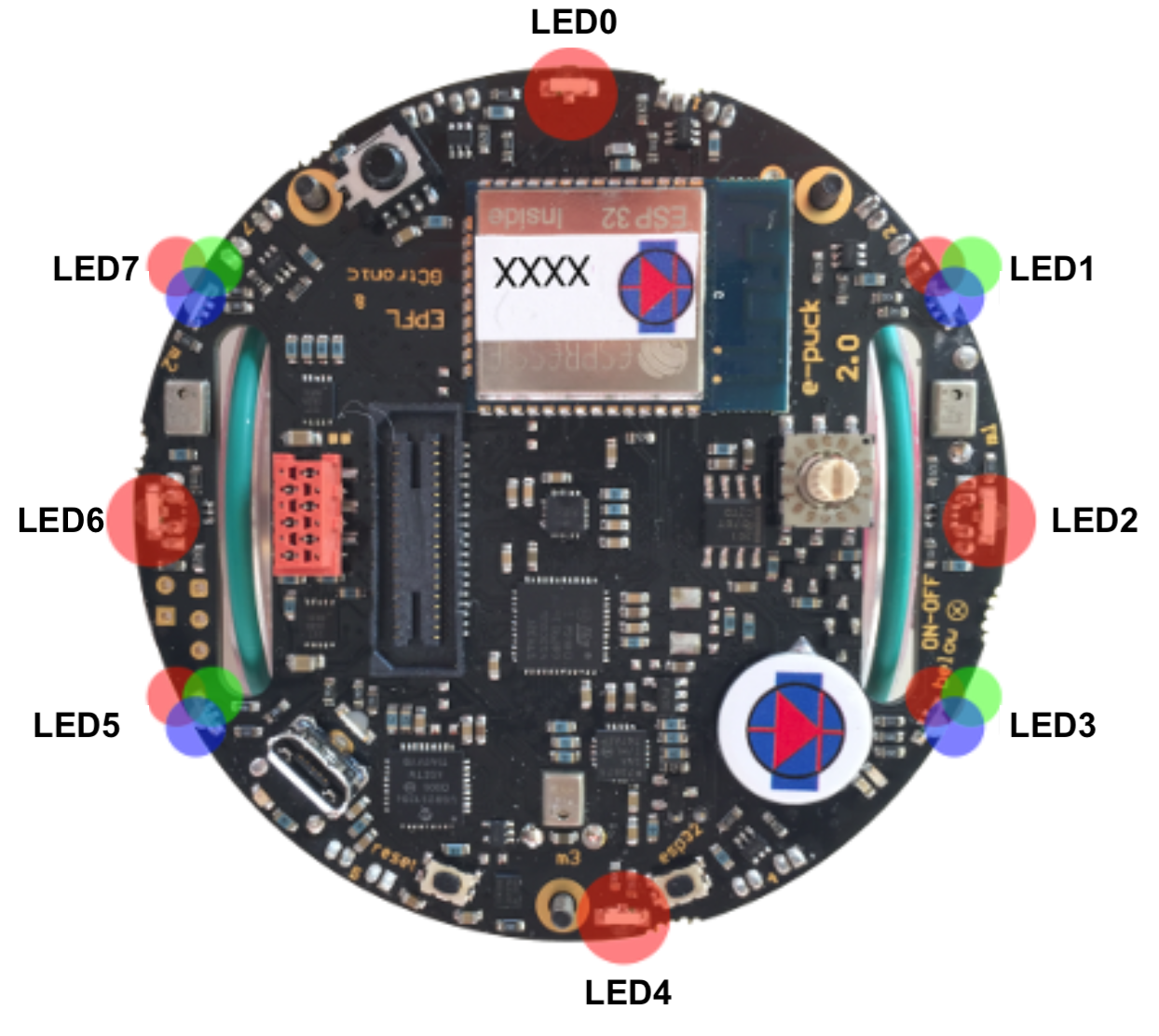
Important
Only LEDs at position 1,3,5 and 7 are RGB
the three colours must be specified to use RGB
- Parameters:
red – int - red intensity value is between 0 (low) and 100 (high)
green – int - green intensity value is between 0 (low) and 100 (high)
blue – int - blue intensity value is between 0 (low) and 100 (high)
- disable_led(led_position)
Turns OFF led at led_position
- Parameters:
led_position – int - (value between 0 and 7)
- enable_all_led()
Turns ON all LED lights
- disable_all_led()
Turns OFF all LED lights
- enable_body_led()
Turns ON green body light
- disable_body_led()
Turns OFF green body light
- enable_front_led()
Turns ON red front light
- disable_front_led()
Turns OFF red front light
- init_sensors()
Starts the robot’s sensors
- disable_sensors()
Disables the robot’s sensors
- get_prox()
Gets the robot’s proximity sensor raw values
Note
IR proximity: between 0 (no objects detected) and 4095 (object near the sensor)
Hint
Array position
prox right front
prox right front diagonal
prox right side
prox right back
prox left back
prox left side
prox left front diagonal
prox left front
- Returns:
the proximity sensor values
- Return type:
int array - (length 8)
- calibrate_prox()
Adjust the sensors to make them as error free as possible
Note
When all LEDs are ON, it indicates that the sensors are calibrating.
- get_calibrate_prox()
Gets the calibrated proximity sensor values
Note
IR proximity: between 0 (no objects detected) and 4095 (object near the sensor)
Hint
Array proximites positions
prox right front
prox right front diagonal
prox right side
prox right back
prox left back
prox left side
prox left front diagonal
prox left front
- Returns:
proximity values
- Return type:
[int] - (length 8)
- init_tof()
Initiates Time Of Flight sensor
- get_tof()
Gets the Time Of Flight value
Warning
The TOF sensor can have different orientations on the robot which will affect measurement.
- Returns:
values in millimetres
- Return type:
int
- disable_tof()
Stops the TOF sensor
- init_ground()
No need for real robots.
- get_ground()
Gets the values from the ground sensors
Note
Between 0 (no surface at all or not reflective surface e.g. black) and 1023 (very reflective surface e.g. white)
Hint
Array positions
LEFT
MIDDLE
RIGHT
- Returns:
ground values
- Return type:
[int] - [LEFT, MIDDLE, RIGHT]
- get_gyro_axes()
Gets gyroscope values (axis x, y and z)
- Returns:
[x, y, z]
- Return type:
[int, int, int]
- get_accelerometer_axes()
Gets the accelerometer axis raw values.
- Returns:
[x,y,z]
- Return type:
array of int
- get_acceleration()
Gets the magnitude of the acceleration vector, whose direction angles are provided by the
get_pitch()andget_roll()functionsNote
acceleration magnitude, between 0.0 and about 2600.0 (~3.46 g)
- Returns:
value of the accelerometer
- Return type:
int
- get_roll()
Gets roll degree reading.
Note
Orientation between 0.0 and 360.0 degrees
- Returns:
roll axis degree
- Return type:
float
- get_pitch()
Gets pitch angle reading.
Note
Inclination between 0.0 and 90.0 degrees (when tilted in any direction)
- Returns:
pitch axis degree
- Return type:
float
- get_microphones()
Gets microphones’ intensity
Note
Mic volume: between 0 and 4095

- Returns:
[front, right, back, left]
- Return type:
array of int
- get_temperature()
Gets the temperature from the robot
- Returns:
temperature
- Return type:
int (degree Celsius)
- get_tv_remote()
Get data from tv remote received by the robot.
toggle: alternatively 1 or 0 address: address in the remote data: output from the remote
returns: toggle, address, data
- init_camera(new_image_folder=None, size=(None, None))
Enables the robot’s camera
- Parameters:
save_image_folder – input directory folder to save the images taken by the robot
camera_rate – camera_rate
- disable_camera()
Disables the robot’s camera
- get_camera()
Gets raw images from robot
Note
More information in Examples/camera
- Return arrays:
[[red],[green],[blue]]
- take_picture(filename=None)
Takes a picture and saves it in defined image folder from
init_camera
- live_camera(duration=None)
Lets you stream from the GUI
The live_camera method need to be called at each step.
- Parameters:
duration – int - duration of the stream. (default: until program ends)
- play_sound(sound_number)
Plays the corresponded music of the sound_number
Warning
Only works with real robots
Plays main Mario’s theme
Plays underworld Mario’s theme
Plays Star Wars theme
- Parameters:
sound_number – int - (between 0 and 2)
- init_client_communication(host_ip='localhost')
Warning
The host should be created first before calling this method. (ref. Examples/Communication)
- send_msg(msg)
Puts a message in queue to other robots
- Parameters:
msg – any
- receive_msg()
Get next message from the robot queue otherwise returns None.
- has_receive_msg()
- Returns:
True if the robot has pending messages in his queue otherwise False.
- clean_up()
Disables all and closes socket.
- initiate_model(weights=None)
Initiate the network used to recognized blocks Need to be called once at the beginning :param weights: a .pt file containing new possible weights (default: the one trained by Vincent Carrel) .. warning:
Only works with real robots
- get_detection(img=None, conf_thresh=0.9)
Analyze the picture passed as img
- Parameters:
img – the 120x160x3 array containing a picture returned by the function get_picture
conf_thresh – an artifical threshold to limit the detections only to a certain confidence level
- Returns:
array of Detected objects
Warning
Only works with real robots
- save_detection(filename=None)
Save the annotated image either with a default name or the one given in filename :param filename: str under which the picture should be saved .. warning:
Only works with real robots
- live_detection(duration=None)
Lets you stream the annotated image from the GUI The live_detection method needs to be called at each step. :param duration: int - duration of the stream. (default: until program ends) .. warning:
Only works with real robots
- get_available_epucks()
Get list of connected epucks to the host.
Warning
Monitor must be online!
- Returns:
array of connected epucks